Max Glenister
A Foray Into Home Automation
This is an overview of why and how I decided to automate part of my home, and build my first IoT device…
I recently decided to change the opening direction of the door in my home office. Previously the door opened in to the room, limiting the usable space next to the door, now it opens against a wall.

It wasn’t until I’d finished changing the door over that I realised that the location of the light switch was now inconvenient as it now sits behind the door when the door is open.
So what am I to do? Put up with having to be mildly inconvenienced on the occasion that I want to turn the light in the office on or off? No! I decided this would be a great use for some automation. I didn’t fancy messing around with relay switches and hooking directly in to the 240v power lines, so I figured I should go for something non-intrusive.
I’ve seen lots of examples of people using Arduino, a servo and some custom made parts to turn their light switches on and off by physically effecting the switch of the light switch.
I’ve got a 3D printer (I’m currently collating a second blog to record and show off what I’ve been doing with it!), I’ve got some knowledge of Arduino and things, so why not give it a go?
I already had a couple of types of Arduino board at my disposal and some servo’s from another unfinished project. They’re SG90 (plastic gear) and MG90S (metal gear) servo’s with 1.8-2.2kg/cm of torque (at 4.8v)– not very powerful!
I decided I’d go with an ESP8266 because it’s cheap, features WiFi built-in and is compatible with Arduino. I bought a NodeMCU board with integrated ESP8266 – two for less than £10 on Amazon!
For the servo I bought a MG996R servo with 9.4kg/cm of torque (at 4.8v) – I’ll be powering the servo off of a 3.3v pin on the NodeMCU board, so this should be powerful enough to turn the light on and off… Just look at the size of it!

Designing the hardware
Most examples of this that I’ve seen were for American-style switches, they look a bit like this:

I live in the UK, and here our switches typically look something like this:

With variations on that for 2-gang (2 switches) 3-gang, and dimmer style switches. The light switch in my office is just a single switch, so that simplifies things a bit.
I looked online to find some measurements for the switch and where the screw holes and things are positioned, and this is all I could find:
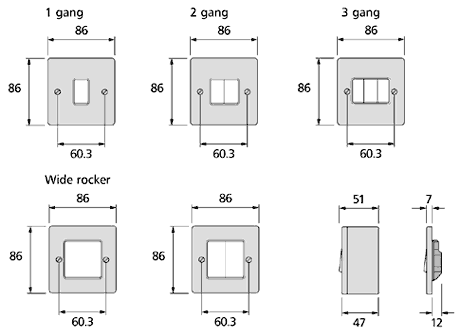
So I took my calipers and measured the actual switch I’ve got.
My plan was to design and print a mounting plate that screws over the existing light switch plate using the existing screws.
This mounting plate would then house the NodeMCU board and position the axle of the servo so that it can turn the light switch on and off. Here’s what I came up with in TinkerCAD:

This first version worked very nicely and fit perfectly. The arms that hold the servo in place were not strong enough and broke pretty much immediately.
My original plan for mounting the NodeMCU board was to screw through some M2 screws in to recessed nuts in the back of the mounting plate, but this didn’t work very well so eventually I decided to reverse that and have the screws permentantly affixed from the back and have the nuts removable.

This worked pretty well, but having to hold the servo in place with Gorilla tape wasn’t ideal for a permenant installation.
Because of the servo mounting failure I went back to TinkerCAD and tried to improve this a bit, utilising the screw mounting holes on the servo. I again hit a problem with the servo mounts breaking as I installed the servo, so decided to attach one screw and add more Gorilla tape until I get around to printing another design.
Hooking up to the cloud – Blynk and you’ll miss it!
The software side of this automation was very straight forward. I’m using Blynk to send commands to the NodeMCU/ESP8266 over the internet.
Blynk is easy to setup using the Arduino IDE. I simply took the Blynk NodeMCU Servo example, added my auth key, wireless SSID and wireless key, flashed the ESP8266 over USB and then connected the servo and power to the NodeMCU board. When the ESP8266 powers up it then automatically connects to the WiFi and awaits commands.
This is the entirety of the code:
#include <ESP8266WiFi.h>
#include <BlynkSimpleEsp8266.h>
#include <Servo.h>

Servo servo;

BLYNK_WRITE(V3) {             // listen on virtual pin 3
  servo.attach(2);            // servo is on gpio2 (d4)
  servo.write(param.asInt()); // move to rotation value passed to v3 pin
  delay(1000);                // ensure that rotation has finished
  servo.detach();             // stop the servo when done
}

void setup() {
  char auth[] = "## auth key ##";
  char ssid[] = "## ssid ##";
  char pass[] = "## psk ##";
  Blynk.begin(auth, ssid, pass);
}

void loop(){
  Blynk.run();
}
Blynk provides an Android app to let you talk to your Blynk-connected devices. On there I simply setup a button that sends a value to the Blynk to configure the rotation angle of the servo.

With my servo I use a rotation of 35 for On and 125 for Off. These values will probably be different for you depending on how your servo is mounted, and at what angle the servo arm is attached.
I’m currently revisiting the design of the mounting plate from scratch using Fusion 360, and thinking of ways to make the servo easily detachable so that the light can be used like it’s the year 2017 or something, but for now it’s working great!
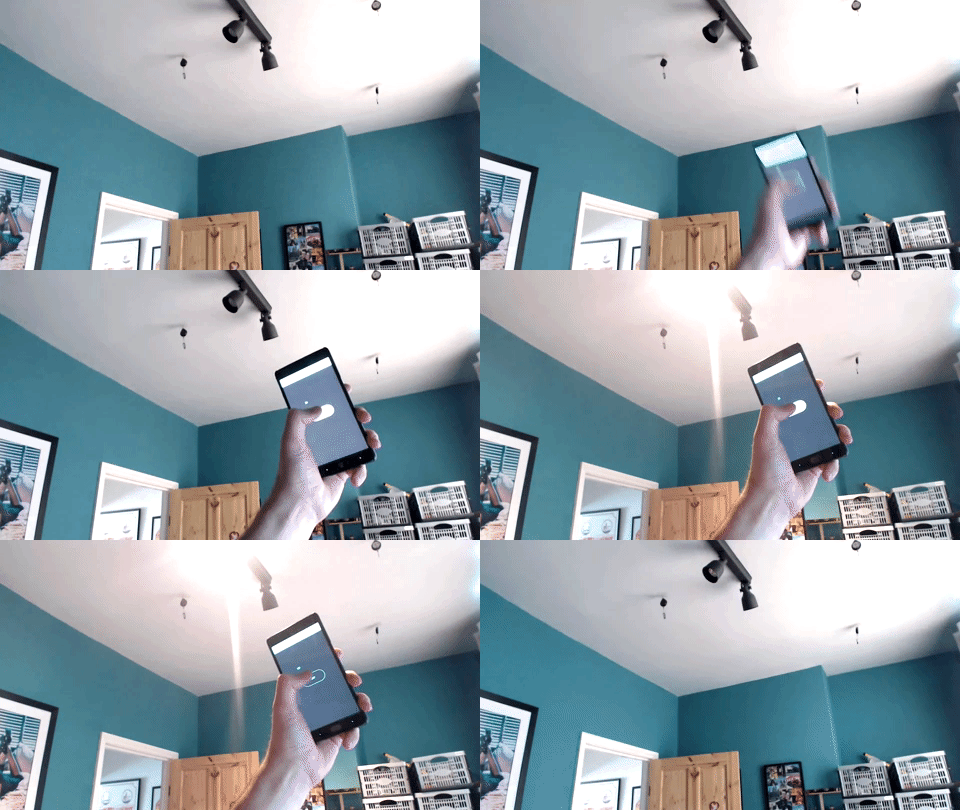
And that’s it, my first bit of home automation; My first IoT device. I’ve scratched the itch, and now I’m thinking about what else I can automate. I’ve got a second NodeMCU waiting to be used after all.