My foobar setup

This post was originally published on moglenstar.net in 2006. moglenstar.net was my first website, active from 2004 to 2008, where I wrote about pixel art, foobar2000, web design, and whatever else was going on. The content below has been recovered from the Wayback Machine and local backups.
moglenstar.net

After the great response to screenshots of my foobar setup, I have decided to post how to make you foobar look just like, or similar to, my foobar setup. Keep reading to find out how.

Misc

  • Foobar 2000 (latest version as of writing is 0.9.4) - here
  • Luna element visual style - here or here (deviantART)

Plugins

  • Columns UI (foo_ui_columns.dll) - here
  • Trackinfo Mod (foo_uie_trackinfo_mod.dll) - here
  • Single Column Playlist (foo_uie_single_column_playlist.dll) - here
  • Foo Custom Info (foo_custominfo.dll) - here

Resources used

The config started off as a mixture of images ripped from windows media player 11, and images created from scratch in photoshop. em3 from neowin.net was interested in the original images and code, so i uploaded them for him and anybody else visiting neowin.net to use, and he made his own variation from them. I then adapted his images, and foo_uie_trackinfo_mod code to create my layout, while at the same time creating a new foo_uie_single_column_playlist config.

download the file below for all of the resources needed to achieve this foobar setup.

  • mog.fm.zip

now extract this file to wherever your foobar2000.cfg file resides. if you selected “enable per-user settings” during install, then this will be “%appadata%\foobar2000*”. if you didn’t select “enable per-user settings” during install, like the following screenshot then this will be wherever you installed foobar to, by default this is “%programfiles%\foobar2000*”.

Unable to recover the image :(

Any plugins you downloaded for foobar are going to have to go into “%programfiles%\foobar2000\components”. i’ve heard of people having problems getting images to show with foo_uie_trackinfo_mod if they haven’t got the latest version of .net installed. if you have any problems you can either install .net from windowsupdate.com or get the visual c++ 2005 runtime files.

Layout

Open the foobar preferences dialogue (ctrl+p) and navigate your way to:

Display > Columns UI

and activate the “layout tab”, now you’re going to need to begin inserting the various panels and things (plugins) that you just installed. Right click on the object in the big white box, and from the menu that appears you can insert the panels and toolbars. you will need to have your layout setup like this:

Unable to recover the image :(

Once you’ve done that, you might want to activate the “main” tab, and untick “show toolbars”. Now that you’ve setup the panel and toolbar placement, you can begin resizing and locking the panels into place, and turning off the headings.

Trackinfo mod

After that is done you will need to right click on your “trackinfo mod” panel, go to settings and then paste the code from the following file:

  • foo_uie_trackinfo_mod code

While you’re there, set the padding (both vertical and horizontal) to 0, and the edge style to “none”, then set the background color the same as the “3d objects” colour of your current visual style. If you’re using luna element blue, then this will be r-236,g-233,b-216.

After that is done, if you put the images and things in the right place, you should now have a nice looking trackinfo_mod panel complete with images, and all that jazz.

Single Column Playlist

The default setup for foo_uie_single_column_playlist is pretty ugly to begin with, so lets remedy that.. right click anywhere on the playlist, and select “settings”.

To begin with, set the row height to “20”, Edge style to “none”, background colour (as with the trackinfo_mod panel) to the “3d objects” color of your current visual style, and then set the font to “tahoma” at size 8. I’m not sure if it’s a bug or not, but with this plugin you need to restart foobar after changing the row height, for it to apply.

for the code to go in each of the boxes, i’ve prepared the following text files, just paste the contents of them into their corresponding boxes:

  • foo_uie_single_column_playlist-group_by
  • foo_uie_single_column_playlist-item_display
  • foo_uie_single_column_playlist-group_display

Buttons and things

For the playback control buttons, i’m using my “no-hue” icon set.. because i’m too lazy to update their page here on my website, i’m linking to my post with them on the hydrogenaudio forums - here

For the rating buttons, if you look in the “mog.fm” folder that you extracted to your foobar2000 folder, you will see a file called “em3_rating_stars.fcb”. an fcb file is basically a way to redistribute button setups, for foobar.

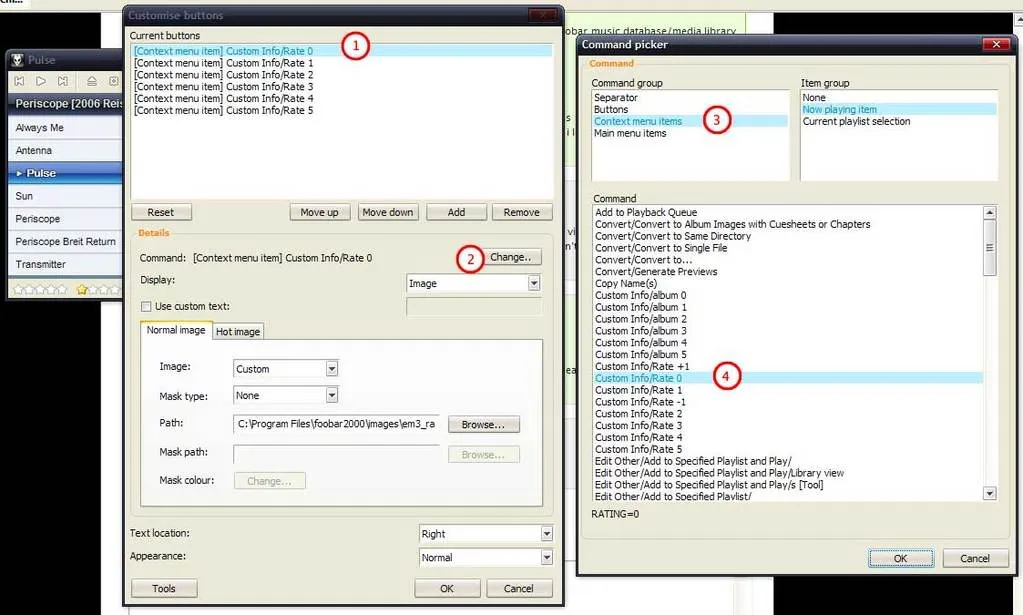
Right click the second set of buttons in your layout (the ones on their own), and click “customise”. at the bottom of the window that opens up, click “tools”, then “load from file” and find “em3_rating_stars.fcb”. once that is loaded, you can just hit ok, and the buttons should be loaded.

if you have any problems with buttons not showing, you might be missing the libpng and zlib dll’s. you can get them here:

  • libpngzlib.rar

just extract that archive to your foobar2000 directory, so that the two files are in the same place as your foobar2000.exe and you should be sorted, after doing that you will need to restart foobar.

This guide is still work in progress, and you betcha i’ve written it badly.. squeezing it in between chem-lab writeups, and other nonsensical college work, i’m not too bothered with spelling/grammar/punctuation, and i don’t suppose you will be either.. but if you have any problems just leave a comment, and remember to leave your e-mail address, and i’m sure i can help you.

Thanks and reference:

This post is also available in plain text

[Archived comments]

varland commented

The mog.fm.zip isn’t working. Nice guide otherwise. :^:

max's avatar picture

max commented

just fixed the links, sorry about that that’ll teach me to work on this before breakfast :X

Tuomas commented

Nice guide, but I can’t get the ratingbuttons to update the song’s rating with just pushing the button. I tried to look in the button’s config but there’s no option to give a “starrating”-command for a button.

max's avatar picture

max commented

tuomas you need the “foo_custominfo” plugin. also, i’ve discovered foo_custominfo only keeps the information for music stored in your music database, atleast for me anyways..

Tuomas commented

I have it installed, but can’t figure out how to use it… Could you describe that in more detail? Thanks a lot in advance

SMMayer.com » Blog Archive » Damn Near Done commented

[…] So tonight, aside from putting the finishing touches to this hallowed ground (what the fuck am I really talking about) I’ll be following my friend Max’s tutorial on configuring foobar. It shouldn’t be too difficult, but then this is me we’re talking about. I have troubled tying fucking shoelaces. […]

max's avatar picture

max commented

tuomas - i can’t really offer much help in the way of describing how to use foo_custominfo, it would take too long to do, but you can follow the “conversation” link here - http://users.tkk.fi/~tahlberg/foo/

Tuomas commented

Now I figured it out. Love those songrating-icons you’ve made - they’re giving a nice touch to my personal mod (which - since I’m not a coder - is ripped from several places smile.

max's avatar picture

max commented

tuomas - i would love to see how it turns out smile

ynnoj commented

I was hoping to use the heart rating buttons featured on your blog instead of the stars, but when I load the .fcb the stars appear. How do I get around this?

OttoD commented

Is there a way to get long album names to appear on multiple lines? Ex. when my playlist shows up for ‘Rotten Apples - The Smashing Pumpkins Greatest Hits’ the album is so long it ends up displaying on top of the band name.

OttoD commented

I should clear that up. Could it be truncated in the trackinfomod stuff when too long, and in the playlist could it simply be put down on another line?

max's avatar picture

max commented

OttoD - find this line in the trackinfo_mod panel:

// this piece of code is em3's
$if(%isplaying%,
  $if($meta_test(artist),
    $caps2(%artist%),
    $substr(%_filename%,1,$sub($strstr(%_filename%, - ),1)))
  $if($or($meta_test(artist,title),$strstr(%_filename%, - )), - )
  $if($or($meta_test(title),$not($strstr(%_filename%, - ))),
    $caps2(%title%),
    $substr(%_filename%,$add($strstr(%_filename%, - ),3),$len(%_filename%)))
)

and replace it with:

// moogle fancy length guessing code
//---------set max length for artist
$puts(alength,20)
//---------set max length for title
$puts(tlength,20)
//---------use elipse on cut down artist/title?
//---------(will show like "Smashing pumpki..." or "Here's to the atom bo...")
//---------depending on how long you set alength and tlength to
$puts(elipse,1)

$if($greater($len(%artist%),$get(alength)),
  $insert($cut(%artist%,$get(alength)),
    $if($strcmp($get(elipse),1),...,),
    $get(alength)),
  %artist%)
$if($greater($len(%title%),$get(tlength)),
  $insert($cut(%title%,$get(tlength)),
    $if($strcmp($get(elipse),1),...,),
    $get(tlength)),
  %title%)
max's avatar picture

max commented

ynnoj - just right click on the stars toolbar, click “customize” and then load each of the heart images for the buttons, replacing the stars.

ynnoj commented

That worked for me, thanks. Good work on the guide, hurry and finish it! wink

OttoD commented

That code works awesome, although there is the small problem that there is no space in between the artist and track name now. Small things smile. How does one fix that? I love foobar but I can’t ever get it to look decent since I can’t code for crap. This is a great setup though. And is there work in progress going on to check if the album is too long in the playlist?

OttoD commented

Yay another double reply. I also just realized albums still bleed over to the next line on trackinfo_mod… but I did find the answer to my previous post.

$if($greater($len(%artist%),$get(alength)),$insert($cut(%artist%,$get(alength)),$if($strcmp($get(elipse),1),…,),$get(alength)),%artist%)

changes to:

$if($greater($len(%artist%),$get(alength)),$insert($cut(%artist%,$get(alength)),$if($strcmp($get(elipse),1),…,),$get(alength)),%artist% - )

max's avatar picture

max commented

find

// if the album tag exists, show it..
$if(%album%,$caps2(%album%))

and replace it with

// if the album tag exists, show it..
// max length for album
$puts(allength,20)
$if($greater($len(%album%),$get(allength)),
  $insert($cut(%album%,$get(allength)),
    $if($strcmp($get(elipse),1),...,),$get(allength)),%album%)

Pretty much the same method as with artist/title to crop the album tag, and you can change the max length to suit you.

max's avatar picture

max commented

ynnoj - resize the trackinfo panel as you require, then right click it and select “lock” if you can’t do it from the right click menu, you can get to it through the “layout” section of columns_ui preferences smile

ynnoj commented

Ooooh, awesome. Thanks. Couple of things: - Are the rating buttons meant to be set up to rate tracks, or are they there for show? If so, how can I set them up? - I’m VERY new to foobar (hehe). After following your guide and achieving the look I posted, I find it difficult to manage my playlists/add remove tracks etc. Have I done something wrong? Once again, thank you!

max's avatar picture

max commented

ynnoj - if you get the foo_custominfo plugin, and you have your music added to the foobar music database/media library thing.. then you can infact rate tracks, using the fcb (buttons) i provided. http://users.tkk.fi/~tahlberg/foo/ read the “discussion” link, for more information about the plugin. also, i should add.. foo_uie_single_column_playlist is a beta plugin, and because of this it lacks the complete features of, say, foo_ui_columns. you can’t add/remove from the active playlist so easily, but what i like to do is have a second layout with foo_ui_columns in place, for arranging/editing playlists and things

ynnoj commented

Hmm, I got my entire music folder added into the library (like you said), and it’s all now viewable in the main window as it’s in a single playlist. However, when I try clicking on the rating buttons, they still don’t seem to work. Maybe I missed something?

max's avatar picture

max commented

See if this helps you at all - http://eolindel.free.fr/foobar0.9/media.shtml also, perhaps try reloading the the fcb for rating buttons, or editing the command for each of the buttons so that it uses “custom info\rating x” where x is 0,1,2,3,4,5

ynnoj commented

Were will I be looking for the command? Which string?

ynnoj commented

Also, how do I shorten the volume bar? Mine takes up half the width of the players, looks out of place..

max's avatar picture

max commented

ratingbuttons

1) select the button to edit 2) click on change, to change the command 3) select “context menu items” if it isn’t already selected 4) select the right command for the volume bar, it’s the same principal as with the trackinfo panel, resizing it i mean.. there should be a grabber at either side of the volume bar, move/resize it how you like, then right click it and “lock”

OttoD commented

I’ve been toying around with small cosmetic things, I think I’ve got it how I want it. This setup is great, thanks so much Max. Now I just want the toaster plugin to be updated. I’m dinking around on Windows 2000 though, so it looks sort of ugly with the way Windows handles some of the GUI, but this should look really nice on XP (otherwise I would include a screenshot). Mainly I made it a bit easier to tell whats playing, used pretty much the default album display so albums aren’t bleeding into the artist, and made it so you can tell what youve got selected without distracting too much from whats already going on. I suck at coding by hand, but I love ripping parts of code out and toying with other peoples stuff, kinda like this. Again, this is a kickass setup Max, thanks.

SINGLE COLUMS: Item Display update:

// if the song is playing, show a nice blue background
// otherwise show the white background
$if(%_selected%,$drawrect(0,0,0,0,brushcolor-SYSCOL-15 pencolor-null))
$if(%isplaying%,
  $imageabs(,,\mog.fm\main_bg_playing.png,)$font(tahoma,8,,80-80-80),
  $imageabs(,,\mog.fm\main_bg.png,)$font(,8,,80-80-80))

// item padding & alignment
$padding(16,3)$align(left,center)

// what to display, in this case title with first letter capitalized
$caps2(%title%)

// my fancy rating code, i use this to determine which rating image to display
// first we check if there is a %RATING% tag present on the song
$if(%rating%,
  // then we check the value against a defined value, and show the corresponding image
  $ifequal($num(%rating%,2),00,$imageabs($sub(%_width%,64),3,mog.fm\rating0.png,),)
  $ifequal($num(%rating%,2),01,$imageabs($sub(%_width%,64),3,mog.fm\rating1.png,),)
  $ifequal($num(%rating%,2),02,$imageabs($sub(%_width%,64),3,mog.fm\rating2.png,),)
  $ifequal($num(%rating%,2),03,$imageabs($sub(%_width%,64),3,mog.fm\rating3.png,),)
  $ifequal($num(%rating%,2),04,$imageabs($sub(%_width%,64),3,mog.fm\rating4.png,),)
  $ifequal($num(%rating%,2),05,$imageabs($sub(%_width%,64),3,mog.fm\rating5.png,),)
,
  // "otherwise" show the "not rated" image (which is 3 greyed out stars in my case
  $imageabs($sub(%_width%,64),3,mog.fm\notrated.png,))
)
// end of fancy rating code

Group Display update:

$imageabs(,,\mog.fm\album_bg.png,)
$padding(4,0)
$font(Trebuchet MS,9,bold glow- glowexpand-0 glowalpha-125,255-255-255)
$align(right,top)%album% '[' %date% ']'
$align(left,top)%artist%

Updated playing bg: main_bg_playing.png

ynnoj commented

Ok, sorted with the volume, thanks. But for the buttons, I don’t have the custom commands in the list. I’ve tried loading the .fcb again. No luck.

ynnoj commented

edit: The seekbar and volume bar seem to share one grabber. eg, I can only make one bigger and the other smaller, not just resize one.

OttoD commented

ynnoj: Try going into the part where you laid out the panels in preferences (the part with buttons seekbar volume, splitters, etc), and add a vertical splitter between the volume and seekbar.

max's avatar picture

max commented

yeah, what ottod said smile as far as the custom buttons, i can only think you havent installed foo_custominfo properly or at all. make sure foo_custominfo.dll resides in c:\program files\foobar2000\components\

ynnoj commented

Ok, sorted with the splitter, silly me! But I’m learning, thanks guys. As for the .dll, I downloaded the one you posted in this blog (0.1.2) and it’s in /foobar2000/components. Still not working.

max's avatar picture

max commented

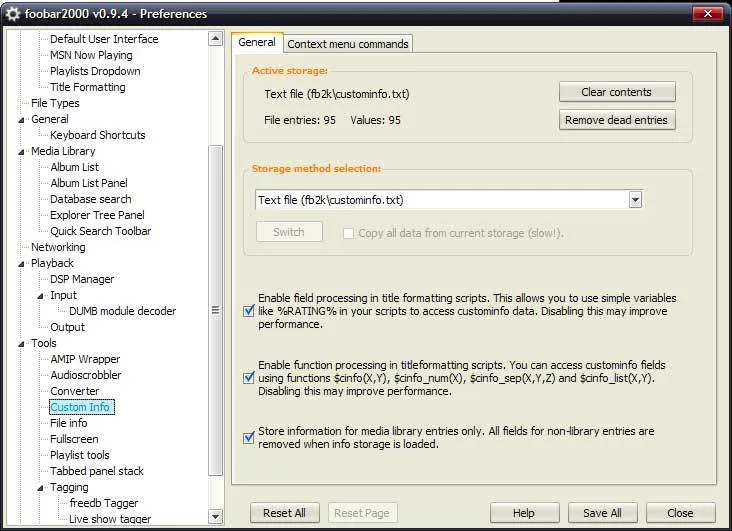
ynnoj - make sure your foo_custominfo prefs are like this. with all of the tickbox’s ticked.

custominfoprefs

and if it’s not greyed out, press the “switch” button. alternatively, try one of the other methods available on the dropdown list, then press the “switch” button. I reccomend restarting foobar once you’ve set it up. if you still have problems, untick the bottom tickbox

ynnoj commented

Awesome that worked, I just had to set a storage method, d’oh! It’s looking great now, but the blue doesn’t really fit my tangerine Windows, so I’m gonna see if I can fix that. Thanks for the help.

max's avatar picture

max commented

i’m just the same.. although i stopped using that “human” vs in favour of luna element :) i can make you an orange album_bg.png here -

album_bg

just replace the blue one, and restart foobar :)

ynnoj commented

OMG, you’re a saint! I’m gonna probably ask of too much now, BUT, could you do an orangey ‘track_bg’ and ‘main_bg_playing’ ? :E

max's avatar picture

max commented

main_bg_playingtrack_bg

enjoy :)

ynnoj commented

Haha great thanks! How about some orangey toolbar buttons and heart ratings? You’ll be a popular man over at Neowin.. wink

max's avatar picture

max commented

heh, got to move my computer and stuff right now and have a tidy up, but i’ll do them after that wink

ynnoj commented

Awesome, thank you. Tangerine buttons ftw!

max's avatar picture

max commented

ottod - just noticed i hadn’t approved your huge comment, it’s done now.. was waiting for moderation because of the link in it :P looks nice, simple but effective changes, welldone. I’m glad you like my config so much smile

ynnoj commented

Is there anyway to change foobar from changing all tags in capitals. For example, it shows up as ‘Death Cab For Cutie’ where as I’d prefer it as a small for. The tags in the actual file use a small ‘for’ so I’m guessing fb2k changes it somehow?

max's avatar picture

max commented

ynnoj - it’s within the code, look for the string you’re looking for (i guess thats the artist) So find %artist% and you will notice it is most likely wrapped with $caps2() so it is like $caps2(%artist%) just remove the $caps2( and ) bits from around it

ynnoj commented

Yeah, that worked. Unfortunately, it didn’t look too good, or as pretty as it was in caps, so I reverted. Is there anyway of stopping foobar from scrolling through the playlist when it plays a new track? I mean like, if I’m playing say an artist in ‘A’ but I’ve scrolled down to ‘Z’, but when the next track in A begins to play it automatically scrolls up? ps. How are buttons/ratings coming along? wink

ynnoj commented

Also, with the play/pause command button, is it possible for the graphic to change to correspond with the situation (whens the track is playing the button is PAUSE, when its paused the button is PLAY). Sorry about all the questions :E

Dave commented

I love this layout and the tutorial is immensely helpful, so thank you very much for it. That being said, I’m trying to figure out two things that have me a little bit stumped. I want to add a way so that I can see what tracks are selected. I tried doing this (I don’t remember the code, I nabbed it from someone else’s config) but for some reason it screwed up the nice blue coloring when a track is playing. Can you help me with this? Also, I’m trying to get album artwork for individual albums in single column playlist displayed in the actual playlist. I’ve seen some people over on foobar’s forums doing it but I can’t figure out how to do it. Any ideas?

max's avatar picture

max commented

Dave, put this somewhere in the “item display” box

$if(%_selected%,
  // - stuff to do if selected (put before the comma)
  // something like $drawrect()
  // - with the parameters specified at trackinfo_mod HA wiki page
,
  // - stuff to do otherwise (you can just leave this blank)
)

As for album art in the playlist, i’m working an a guide for that. using the undocumented $imageabs2() function of the latest foo_uie_single_column_playlist.

ynnoj commented

Do you have any solutions for my problems, max?

ynnoj commented

Can you help me out with those problems above? Hate to nag, but did you get round to looking at those buttons and ratings for Tangerine? tongue

ynnoj commented

Can you help me with the problems I posted above? Also, how are those Tangerine buttons and rating stars coming along? :P You could look to http://tango.freedesktop.org/Tango_Icon_Gallery for some inspiration. It’s just the colouring of those icons, they don’t really fit the Tangerine look.

Tuomas commented

Check this out http://retrobumbum.blogspot.com/ to see how I used your trackinfo. Thanks a lot for your guide and configs! //moglen edit: fixed the link, it’s okay to use url’s here smile it just means i’ve got to moderate the comment

Max's avatar picture

Max commented

ynnoj - as far as i’m aware there is no way around the problem you described, so you will just have to live with it :P the buttons are coming along, i made 6 or so of them, the basics play/pause/stop/next/prev/open last night.. i’m not at my pc, or even at home right now, and won’t be until sometime tommorow evening. so inbetween visiting family, and doing chemistry work.. i’ll see if i can get them done smile

ynnoj commented

Sweet, that’s great news. No need to hurry them though, especially if you got more important things going on. ps. Sorry for the spam earlier sad

OttoD commented

Just a helpful tip - I changed the font used to display the album and year to Calibri (size 11), its a teensy bit smaller, and allows much longer album names to come up. I can actually display all of ‘Smashing Pumpkins {Rotten Apples} The Smashing Pumpkins Greatest Hits’, which coincidentally was the one that was getting messed up in the first place… too bad ‘Those that tell the truth shall die, Those that tell the truth shall live forever’ is still too long…. sad poor Explosions in the Sky.

ynnoj commented

yeah I had to edit my font size to 8 as well, it works for most albums, apart from the stupidly long track names on the Panic! at the Disco album. I like the smaller font though, fits the player better overall.

foobar2000, nouvelle tête « JYC commented

[…] Le tout en parti inspiré de ce bon petit guide. […]

Flutiss commented

How do I change the background color behind my buttons?

Max's avatar picture

Max commented

flutiss - it depends on the visual style you’re using, i’m afraid.

ynnoj commented

I’m having some issues with my playlist sorting. When I re-scan my media folders, and try to add newly added albums to my FULL playlist, these new albums aren’t being sorted into the playlist correctly. For example, Kasbian is being placed at the bottom of the playlist, after every other artist. All of my other files in the library are sorted by artist, then album name.

Exit Does Not Exist » A Rather Neat Foobar2000 Guide commented

[…] A rather neat foobar2000 guide […]

Dennis commented

Hi there! i was searching around for goodlooking configs for fb2k and found this one but when i try to download the foo_uie_single_column_playlist.dll from http://users.bowie-cass.com/singa/foo_uie_single_column_playlist.zip it wont work at all i just get a 404 error msg. Any one got a working link for that dll?

Dennis commented

No need for answere i found it after a whole hour of searching :S.. Nice config!

Atul Varaskar commented

Trackinfo Mod (foo_uie_trackinfo_mod.dll) - here Single Column Playlist (foo_uie_single_column_playlist.dll) - here links down could you give us a mirror

Dave commented

I’ve got one more quick question for you. I want to create a system that utilizes playcount to determine the rating of a track. I’ve got %play_counter% being updated each time a track is played, and the way I figure is that I could say if %play_counter% is greater than 5, then %rating% is 0, if %play_counter% is greater than 10, %rating is 1, etc. Only problem is, I can’t figure out a way to define the value of an id3 field such as %rating%. Do you know what I’m missing?

Benjamin commented

Can somebody tell my how to install the Rating System with the stars and that stuff?

vip commented

Hi, nice config … but i’m having problems. I searched for foobar2000.cfg, to no avail … so i just put the mog.fm in my program files\foobar2000 folder and they seem to not load. I’ve read and re-read this guide many times to no avail this is what it looks like at this point in time … http://upitfree.com/v2/show.php/2115_see.JPG.html

Benjamin commented

ok got the rating smile but i have another problem Can somebody tell my how to switch the symbols in the colums playlist? Today it looks like that http://s3.bilder-hosting.de/img/RN0YZ.png but i want stars instead of the circles and the squares Thank you for the help Benjamin

Max's avatar picture

Max commented

@ vip: try going to Start > run and typing in %appdata%\foobar2000 with the quotation marks, put the mog.fm folder in there.

@ Benjamin: in the columns playlist, for the rating column there is probably some code like $if(%rating%,5,●●●●●,) replace the “●” or whatever (it might look like a rectangle for you) with whichever character you want. now this character will be font dependant, so find out which font you’re using, then go to start > all programs > accessories > system tools > character map, choose the font that you’re using in foobar and then select a symbol that you like. Good fonts to use are any that are unicode, because they contain a wide variety of standard and non-standard characters.

Reject commented

Hey, Max! And OttoD, and ynnoj! I appreciate your tutorial, your hard work, and your brilliance with this setup. Thank you all, so much. Just made my night.

Katsume commented

I love this Foobar set up! I’m fairly new to it but this tutorial has shown me a lot about how to customize my Foobar. The only thing that bothers me is how light the trackinfo textures and things are. I run a dark desktop theme (black, white & Grey) and the baby blue just makes it look off o.0;. Is there any way you could make some darker textures? Thanks for the awesome tutorial and keep up the great work! =D

Vamsi commented

I’ve been trying to album art displayed next to songs withing the playlist. I saw some cool ones on HydrogenAudio and I’ve been looking through forums for a few days now without any luck. Got any suggestions? I’m looking to put album artwork in like this.

ralph commented

The link is down… http://users.bowie-cass.com/singa/ Forbidden You don’t have permission to access /singa/ on this server. Patchy/1.3.31 Server at users.bowie-cass.com Port 80 can anyone post a mirror for Trackinfo Mod and Single Column Playlist?

[Webmentions]

Want to reply? I've hooked up Webmentions, so give it a go!