These tabs they are a changin'
Max Glenister
The latest update to Chrome (25.0.1364.99) seems to have brought some slight tweaks the interface.
The tab bar has seen some tweaks to the spacing of the close button, as well as the hover/active/inactive states of tabs, and the infamous blank ‘new tab’ button has been stretched a little. The inactive state of tabs and the ‘new tab’ button seems to blend in to the background a bit more too.
The omnibar has lost a couple of pixels of weight, and over-all the whole interface is a lot more flat/smooth now.
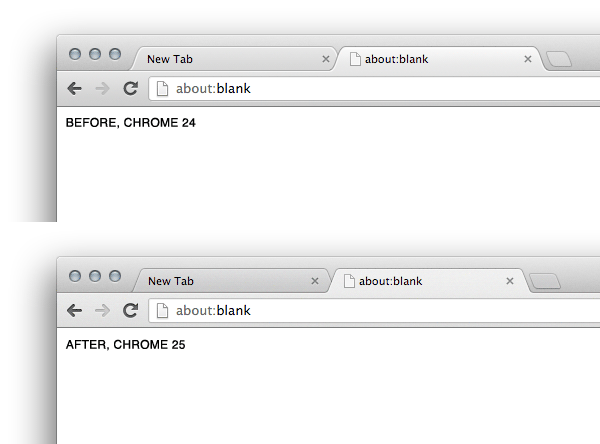
Very subtle changes, but very effective.
Being able to confirm this on my Mac when I got home, and having the foresight to take a before and after screenshot has re-assured me that I’m not imagining things. Nice work Google Chrome team!
Related posts
- Launching Sketch Toolbox from inside Sketch
I’ve been making use of Sketch a lot lately. One of the coolest features of Sketch is it’s plugin support. I’m using a tool called Sketch Toolbox to manage plugins in Sketch – this functions a lot like Package Control for Sublime Text, but it’s a stand-alone application.
- Creating 'Material Design' shadows in Photoshop
Somebody over on Designer News asked how to re-create the various z-height shadow effects from Google’s Material Design in Photoshop.
- Converting SVG to PNG online and in your terminal
This post is mostly for my own benefit on the rare occasion that I have to convert SVG files to PNG. I always spend a large amount of time looking for an online SVG to PNG converter or a terminal one-liner to do this.
Discussion
No interactions yet
Join the conversation
Reply from your own site with a Webmention (how?).