24: Basic Game Board
This post was published in 2016 and is kept here for reference. It may contain information that's outdated or inaccurate.
For today’s hack we’re going to start putting the teVRis game board together. We’ve already looked at positioning objects in a circle around the camera, but that doesn’t solve the whole problem.
We need to position objects around just part of a circle so that we can see the whole game board at once. I’m using some magic numbers here, but this basically gives us the game board wrapped around the visible portion of a circle around the camera:
var positions = [];
var circle = {
  width: 10,
  depth: 10,
  radius: 50
};
var step = (Math.PI * .8) / cols;
var angle = Math.PI * 1.133;
for (var c = 0; c < cols; c++) {
  positions.push([]);
  for (var r = 0; r < rows; r++) {
    var y = (blockSize + 1) * r;
    // put the calculated cell position in our array
    var position = new T.Vector3(
      (cols / circle.width) + (circle.radius * Math.cos(angle)),
      y,
      (cols / circle.depth) + (circle.radius * Math.sin(angle))
    );
    positions[c].push(position);
  }
  angle += step;
}
I only need to calculate the positions for each block once, I can then re-use them at no extra cost:
var newPiece = function () {
  var piece = new T.Mesh(block.geometry.clone(), block.material.clone());
  var pos = positions[middleCol][0];

  piece.position.set(pos.x, pos.y, pos.z);
  piece.lookAt(new T.Vector3(camera.position.x, pos.y, camera.position.z));
  piece.material.opacity = 1;
  // eventually generate shapes here
  return piece;
};
Next we need to draw the player piece. We’ll call a function at every requestAnimationFrame that changes the Yposition of the piece at a given interval. In this case it’s every 1000ms or every 1s:
var dropInterval = 1000;
var lastTime = 0;
var dropCounter = 0;

// make the piece drop
var updatePosition = function (piece) {
  var y = blockSize + 1;
  var now = Date.now();
  var delta = now - lastTime;
  dropCounter += delta;

  if (dropCounter >= dropInterval) {
    if (piece.position.y > 0) {
      piece.position.y -= y;
    } else {
      piece.position.y = positions[middleCol][positions[middleCol].length - 1].y;
    }
    dropCounter = 0;
  }
  lastTime = now;
};
And that’s it for today, tomorrow we’ll look at creating some actual Tetrominoes.
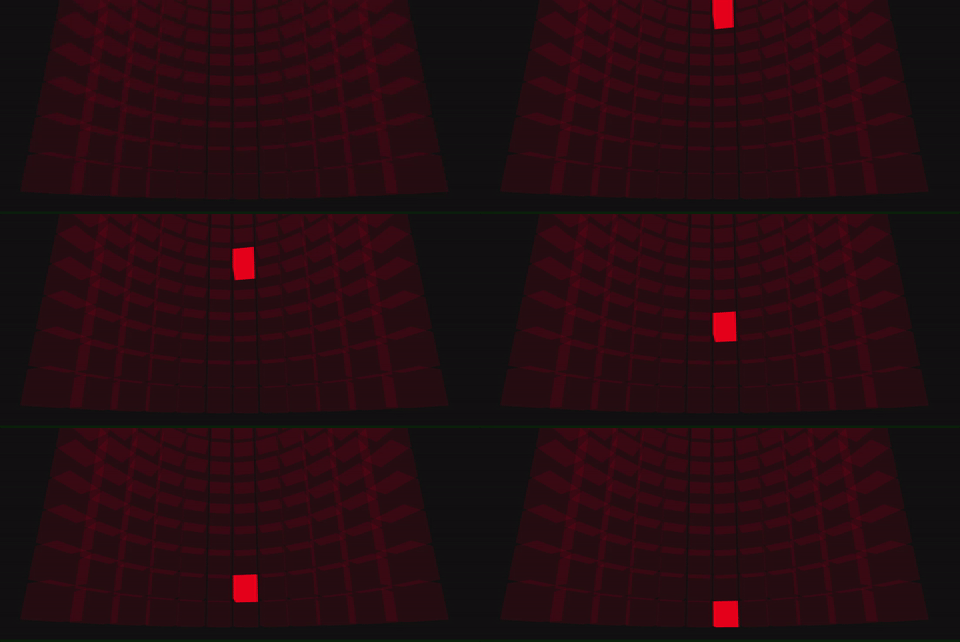
Cardboctober day 24
View this Cardboctober hack • View the source code on Github
View the other submissions for day 24 on the Cardboctober website.
Part of the "Cardboctober" series
- Announcing Cardboctober
- 01: Basic VR
- 02: Raycaster based look interaction
- 03: Even better gazed based look interaction
- 04: Skyboxes and generating meshes
- 05: Loading external models
- 06: VR Pairs Game
- 07: Cardboard hardware (cardware?)
- 08: Playing sounds
- 09: Speech recognition
- 10: HTML5 Video
- 11: Webaudio Beat Sequencer
- 12: AAAAH! Zombies
- 13: AAAAH! More Zombies
- 14: Debugging your Cardboard with Chrome
- 15: The Hierarchy of Needs in Quick Google Cardboard Hacks
- 16: Getting in and out of Fullscreen
- 17: Displaying Pertinent Information
- 18: Moving around in VR
- 19: Which way is North? Part 1
- 20: Which way is North? Part 2
- 21: One size doesn't fit all
- 22: Putting it all together
- 23: Planning Tetrominoes in VR
- 24: Basic Game Board
- 25: Creating and Moving Pieces
- 26: Rotating Pieces
- 27: Moving with gaze
- 28: Planning Revisited
- 29: Blocks out of the pram
- 30: Github Contributions
- 31: Something in the Shadows
Want to reply? I've hooked up Webmentions, so give it a go!