A menu and state system
This post was published in 2019 and is kept here for reference. It may contain information that's outdated or inaccurate.
I’ve been playing with state systems lately, and decided to build a menu system to play with going between each state.
First of all, my helper functions… I’m using this to print outlined text:
-- print text with an outline
function printo(str,x,y,c1,c2)
 for xoff=-1,1 do
  for yoff=-1,1 do
    print(str,x+xoff,y+yoff,c1)
  end
 end
 print(str,x,y,c2)
end
The menu function has two modes, one for running in _update() and one for running in _draw(), you control this by passing "u" or "d" as the second argument.
The first agument takes a table containing a menu definition. I’ll talk more about this with an example after the wall of code:
function menu(m, mode)
 local ic=#m.items
 if mode == "u" then
  if btnp(2) then
   -- up
   m.selection -= 1
   if m.selection < 1 then
    m.selection = 1
   end
  end
  if btnp(3) then
   -- down
   m.selection += 1
   if m.selection > ic then
    m.selection = ic
   end
  end
  if btnp(5) then
   -- x
   if m.items[m.selection][2] then
    m.items[m.selection][2]()
   end
  end
 end
 if mode == "d" then
  local padding={4,4,0,6}-- t/r/b/l
  local lineheight=8
  -- find longest string
  local widest_str=0
  for i,item in pairs(m.items) do
   if #item[1] > widest_str then
    widest_str = #item[1]
   end
  end
  local width = (widest_str*4)+padding[2]+padding[4]
  local height = (ic*lineheight)+padding[1]+padding[3]
  local xoff = 64 - (width/2)
  local yoff = 64 - (height/2)
  local x0 = xoff
  local y0 = yoff
  local x1 = xoff + width
  local y1 = yoff + height
  -- box
  rect(x0-2,y0+1,x1+2,y1+2, 5)
  rect(x0-1,y0-1,x1+1,y1+1,0)
  rectfill(x0,y0,x1,y1,1)
  rect(x0,y0,x1,y1,7)
  -- aditional text
  if m.guide then
   local _w = #m.guide*4
   local _x = 64 - (_w/2)
   local _y = y1+padding[1]+2
   printo(m.guide,_x,_y, 0, 7)
  end
  -- items
  for i,item in pairs(m.items) do
   if i == m.selection then
    -- selection highlight
    printo(
     item[1],
     xoff+padding[4],
     yoff+padding[1]+((i-1)*lineheight),
     0,7
    )
    if m.items[m.selection][2] then
     palt(0,false)
     palt(1,true)
     local xadj=(5 - time()%3)
     spr(1,x0-xadj,y0+padding[1]+((i-1)*lineheight) - 1)
     pal()
    end
   else
    -- normal item
    printo(
     item[1],
     xoff+padding[4],
     yoff+padding[1]+((i-1)*lineheight),
     0,6
    )
   end
  end
 end
end
There’s a lot going on there, but it’s basically maintain a counter for the user’s current selection, and then if there is a function associated with a menu item call it when the x button is pressed.
Here’s how the menu definitions look
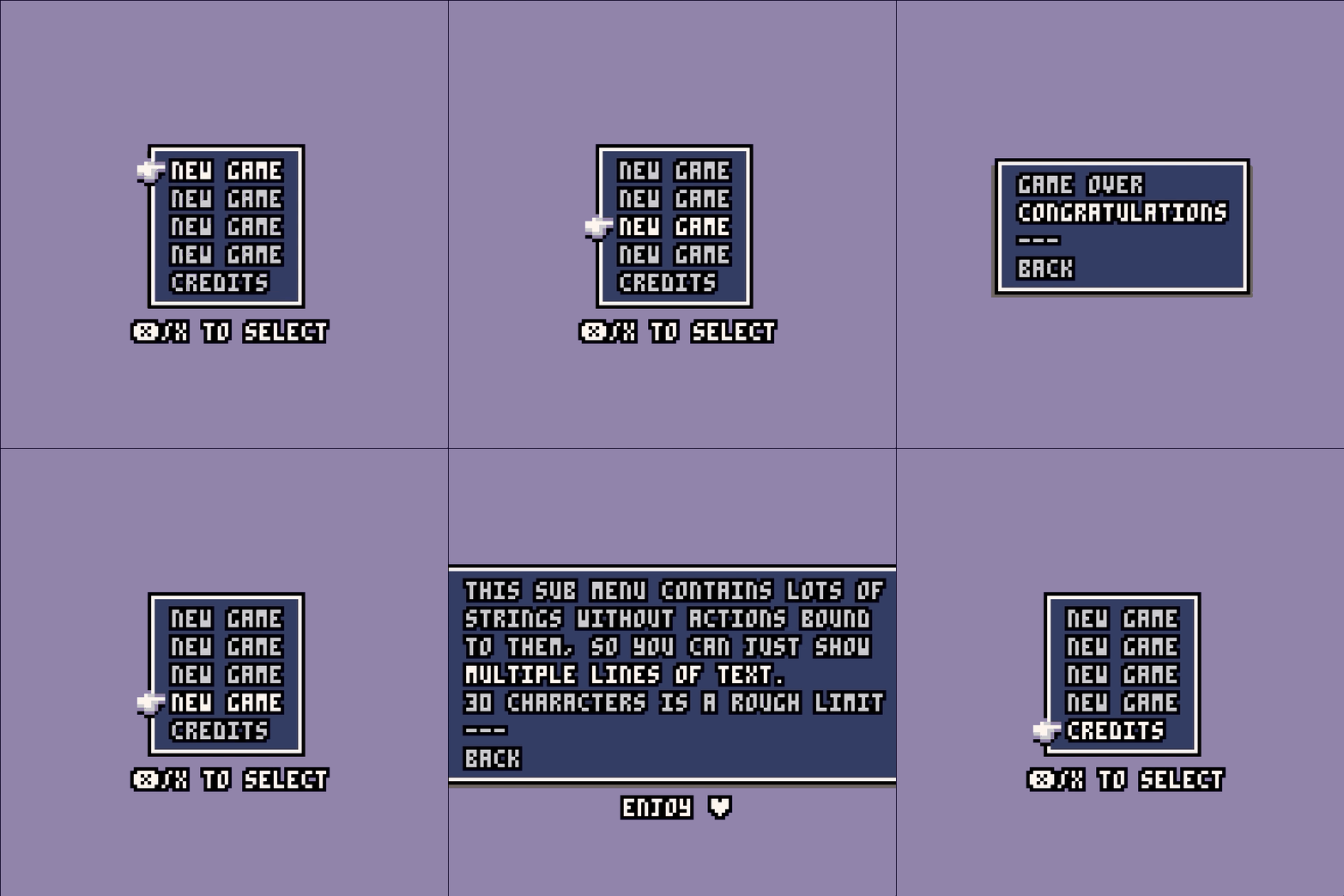
_menu_start = {
  selection = 1,
  items = {
   {"new game", game},
   {"new game", game},
   {"new game", game},
   {"new game", game},
   {"credits", credits}
  },
  guide="❎ to select"
}

_menu_game = {
  selection = 1,
  items = {
   {"game over", die},
   {"congratulations", win},
   {"---"},
   {"back", start}
  }
}

_menu_credits = {
  selection = 1,
  items = {
   {"this sub menu contains lots of"},
   {"strings without actions bound "},
   {"to them, so you can just show "},
   {"multiple lines of text."},
   {"30 characters is a rough limit"},
   {"---"},
   {"back", start}
  },
  guide="enjoy ♥"
}
You can go between menus using a state system. Here’s the barebones of a state system. We assign a new function to _upd() and _drw() each time the state changes.
function _init()
  start() -- defined later
end

--update
function _update()
 _upd()
end

function update_start()
 menu(_menu_start, "u")
end
function update_game()
 menu(_menu_game, "u")
end
function update_credits()
 menu(_menu_credits, "u")
end

--draw
function _draw()
 cls(13)
 _drw()
end

function draw_start()
 menu(_menu_start, "d")
end
function draw_game()
 menu(_menu_game, "d")
end
function draw_credits()
 menu(_menu_credits, "d")
end

-- functions that are called directly
-- through menu selections

function start()
 _upd=update_start
 _drw=draw_start
end
function game()
 _upd=update_game
 _drw=draw_game
end
function credits()
 _upd=update_credits
 _drw=draw_credits
end
And here’s how it looks in action. I’ve got a custom sprite for the selection hand drawn in sprite slot 1:
Want to reply? I've hooked up Webmentions, so give it a go!